

Table of Contents
ToggleWhatsApp Business Calling API for Contact Centers: The Ultimate Business Guide
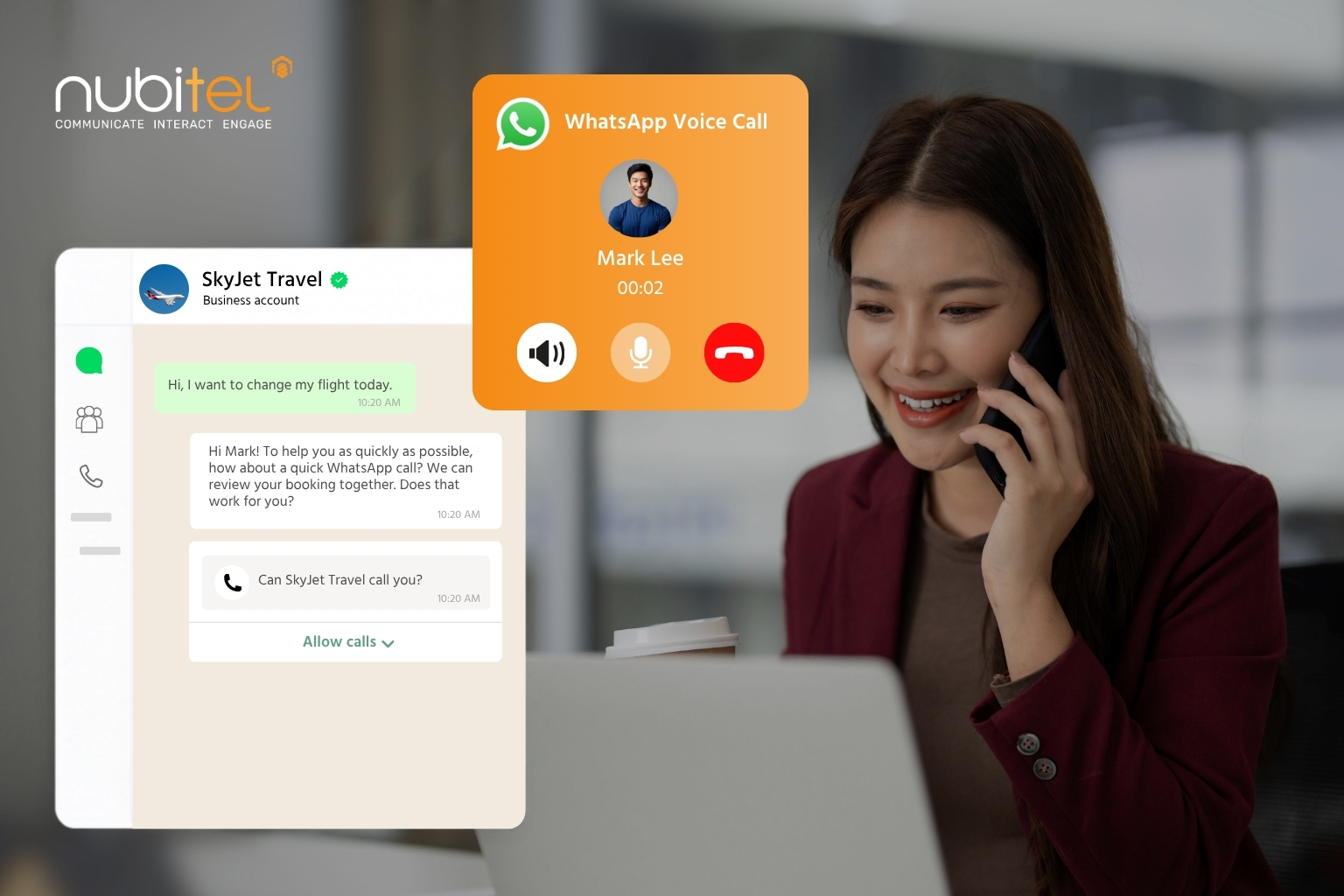
The launch of the WhatsApp Business Calling API in July 2025 marked a significant milestone in customer engagement.
For the first time, businesses can combine messaging and voice within a single WhatsApp conversation, enabling faster, more contextual interactions without disrupting the customer journey.
This guide explains how the WhatsApp Business Calling API for contact centers works, the business value it delivers, and how enterprises can integrate it into a modern omnichannel contact center strategy.
What Is the WhatsApp Business Calling API
The WhatsApp Business Calling API enables businesses to make and receive voice calls directly within WhatsApp, allowing customers to transition seamlessly from chat to voice without leaving the app. Conversation history remains intact, giving agents full context to resolve enquiries more efficiently.
Built on the WhatsApp Business Platform, the API is designed for medium and large enterprises managing customer engagement at scale. Unlike traditional phone systems, it connects voice and messaging within a single customer journey while supporting CRM integration, workflow automation, AI, and omnichannel contact center platforms.
WhatsApp Business App vs. WhatsApp Business API
Although both enable businesses to communicate on WhatsApp, they serve different operational needs.
Capability | WhatsApp Business App | WhatsApp Business API |
Best for | Small businesses | Medium to large enterprises |
Team access | Single user | Multiple agents on one business number |
Customer volume | Low | High-volume customer engagement |
Voice calling | Not supported | Supports WhatsApp Business API voice call |
Automation | Basic quick replies | AI agents, conversational AI, and workflows |
Integrations | None | CRM, ERP, and AI platforms |
Analytics | Basic | Enterprise reporting and SLA monitoring |
Ideal use case | Manual customer conversations | Customer service, sales, and enterprise operations |
For organizations looking to scale customer engagement, the WhatsApp Business Calling API for contact centers provides the flexibility, automation, and integrations required to support enterprise operations while delivering a seamless customer experience.
How Does the WhatsApp Business Calling API Work
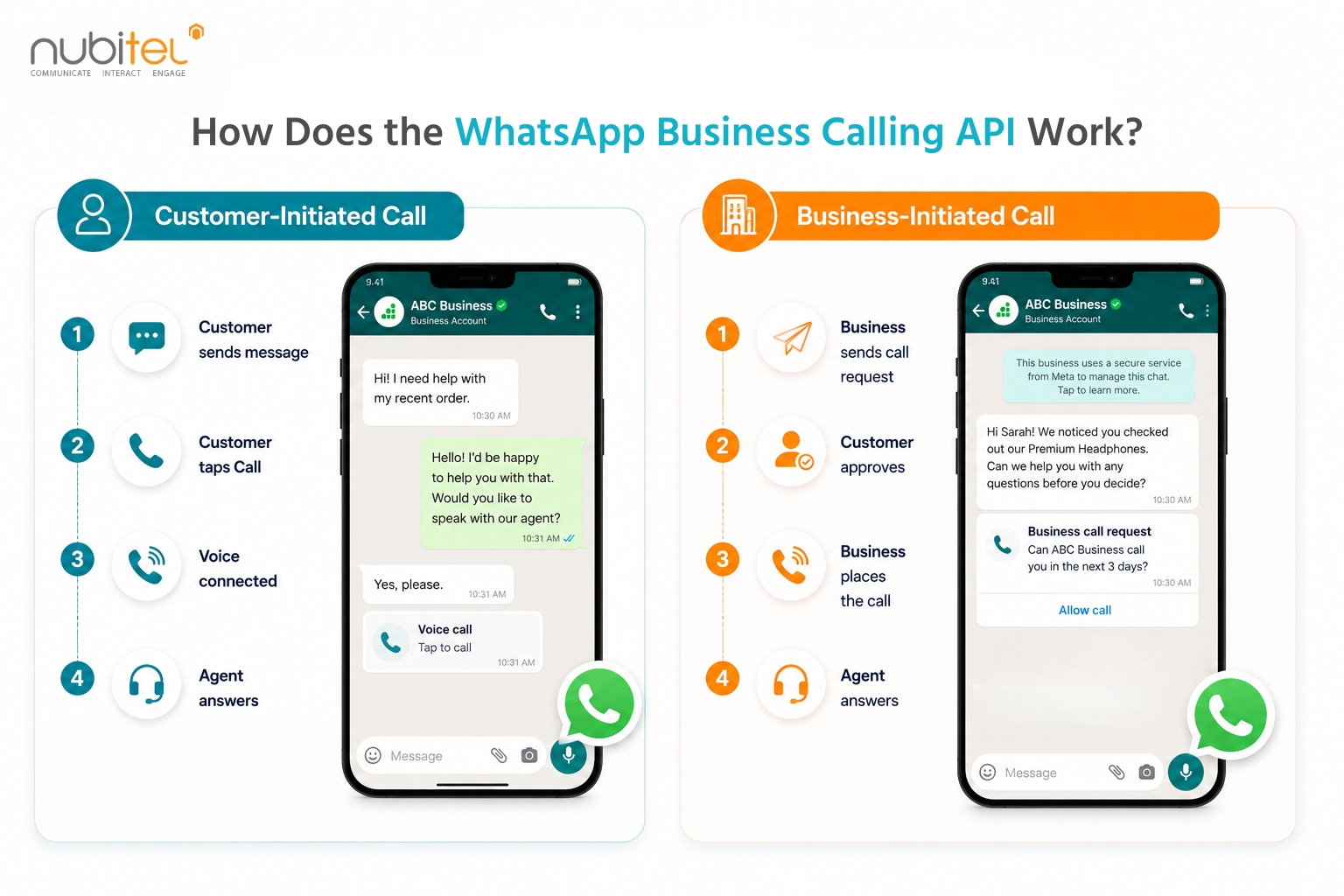
The WhatsApp Business Calling API for contact centers supports both inbound and outbound voice calls, giving businesses the flexibility to engage customers while maintaining privacy and control. Unlike traditional telephony, every call is linked to the existing WhatsApp conversation, allowing agents to access the complete interaction history before answering.
Customer-Initiated Calls
Customers can start a voice call directly from a business’s WhatsApp profile or through click-to-call links embedded in websites, QR codes, or interactive messages. This allows them to escalate from messaging to voice whenever they need real-time assistance, without leaving WhatsApp.
For contact centers, inbound calls are routed through the customer engagement platform, enabling agents to handle calls alongside other digital channels from a unified workspace.
Business-Initiated Calls
Businesses can also place outbound calls using the WhatsApp Business API calling capability, but only after receiving explicit customer consent.
The process is straightforward:
- The business sends a permission request through WhatsApp.
- The customer accepts the request.
- The business has up to 72 hours to initiate the voice call.
This permission-based model helps protect customer privacy while ensuring outbound communication remains expected and relevant.
Business Use Cases for the WhatsApp Business Calling API
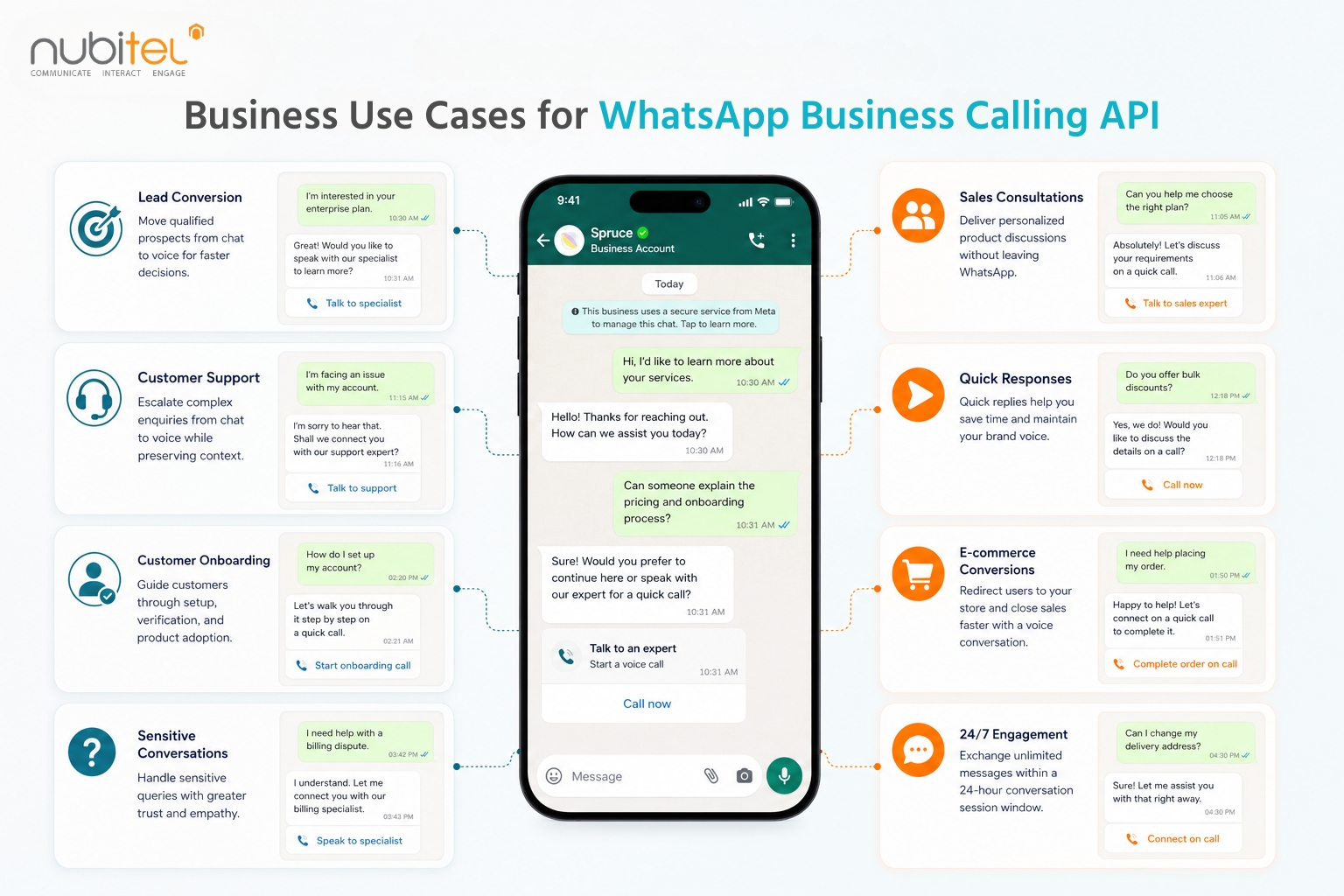
The true value of the WhatsApp Business Calling API for contact centers lies in enabling businesses to move naturally between messaging and voice based on customer needs. Instead of treating voice as a separate channel, organizations can use it strategically throughout the customer journey.
1. Convert High-Intent Leads Faster
Not every sales conversation ends in chat. When prospects ask detailed questions about pricing, product capabilities, or implementation, messaging can slow down decision-making.
With the WhatsApp Business Calling API, sales representatives can seamlessly transition qualified leads from chat to a voice call within WhatsApp to address objections, provide personalized consultations, and accelerate purchasing decisions without disrupting the conversation.
2. Enable More Effective Sales Consultations
Enterprise sales often involve multiple stakeholders, product demonstrations, or solution discussions that require real-time interaction.
Rather than scheduling separate phone calls, businesses can continue the conversation immediately within WhatsApp. This shortens sales cycles while giving representatives complete visibility into previous messages, customer requirements, and shared documents.
For organizations evaluating the best platform WhatsApp Business Calling API sales teams can use, choosing a solution that unifies messaging, voice, CRM, and customer history helps sales teams engage prospects more effectively and close opportunities faster.
3. Resolve Complex Customer Support Issues
Messaging is ideal for routine enquiries, but technical troubleshooting, billing disputes, or account-related issues often require a live conversation.
The WhatsApp Business Calling API for contact centers enables support agents to escalate from chat to voice instantly while retaining the complete conversation history. With immediate access to customer context, agents can diagnose issues faster, reduce handling time, and improve first-contact resolution.
4. Handle High-Value and Sensitive Interactions
Certain customer conversations require empathy, reassurance, or identity verification that text alone cannot provide.
Financial consultations, healthcare enquiries, insurance claims, VIP customer support, and complaint resolution benefit from voice conversations while maintaining the convenience and security of WhatsApp. Since every WhatsApp Business API voice call remains linked to the existing chat, agents can provide more personalized service without asking customers to repeat information.
5. Recover Abandoned Conversations
Customers don’t always complete conversations. They may stop responding while requesting a quotation, leave an issue unresolved, or abandon a support interaction altogether.
With customer consent, businesses can use WhatsApp Business API calling to proactively reconnect with customers, clarify outstanding questions, and continue the conversation before valuable opportunities are lost.
6. Deliver a Better Customer Onboarding Experience
Customer onboarding often involves multiple steps, from account setup and document verification to product walkthroughs and user training.
Businesses can automate onboarding messages through WhatsApp while allowing customers to instantly escalate to a voice call whenever additional guidance is needed. This creates a smoother onboarding journey, reduces customer confusion, and accelerates time-to-value.
7. Enhance Post-Purchase Customer Engagement
Customer relationships don’t end after a purchase. Follow-up calls for installation support, product activation, warranty registration, service reminders, or customer success reviews help strengthen long-term engagement.
By combining messaging with WhatsApp voice calling, businesses can provide proactive post-purchase support while maintaining a complete history of every customer interaction, making future conversations more informed and personalized.
>>> You might be interested: Human-AI Collaboration in Customer Service: The Future of AI-Powered CX
Key Business Benefits of the WhatsApp Business Calling API for Contact Centers
Integrating the WhatsApp Business Calling API for contact centers delivers more than an additional communication channel. It helps organizations improve both customer experience and operational performance.
1. Deliver a Unified Customer Journey
Customers can transition from messaging to voice without changing applications or repeating information, creating a seamless experience from the first enquiry to final resolution.
2. Improve Agent Productivity
Agents access complete conversation history before every call, reducing context switching and enabling faster, more informed conversations.
3. Increase First Contact Resolution
With messaging history, customer details, and voice interactions available in one place, agents can resolve more enquiries during the first interaction.
4. Strengthen Customer Trust
Voice conversations take place within WhatsApp’s trusted environment using end-to-end encryption and verified business accounts, helping customers feel more confident when discussing sensitive matters.
5. Improve Operational Efficiency
Managing separate systems for messaging and voice often creates operational silos, duplicate workflows, and fragmented customer data. The WhatsApp Business Calling API for contact centers unifies both channels within a single conversation, enabling contact centers to streamline workflows, improve reporting, and reduce the complexity of managing multiple communication platforms.
Why Choose Nubitel CX for WhatsApp Business Calling API
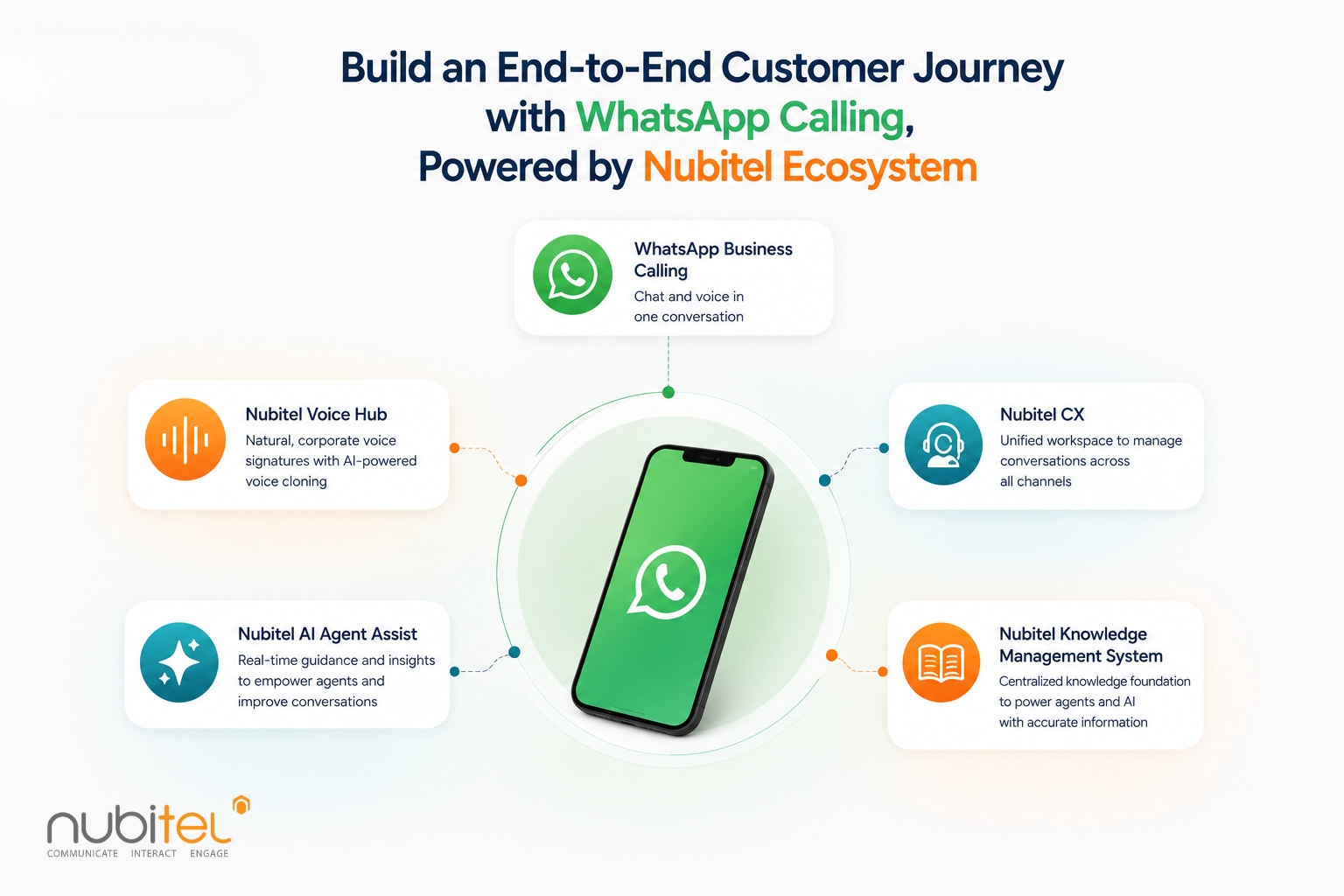
Enabling the WhatsApp Business Calling API is only the first step. To deliver a truly seamless customer experience, enterprises need a platform that unifies voice, messaging, AI, and human agents into one continuous customer journey.
As a Meta Business Partner, Nubitel has integrated the WhatsApp Business Calling API directly into Nubitel CX, allowing businesses to manage WhatsApp voice calls alongside traditional telephony, email, live chat, social media, and other digital channels from a single omnichannel contact center platform.
This transforms WhatsApp into much more than a messaging channel. It becomes a borderless voice channel for customer service, enabling organizations to operate a dedicated customer service hotline within the app customers already use every day. Whether serving customers locally or across multiple countries, businesses can intelligently route every call to the right team, location, or skill group while keeping the entire conversation connected.
Unify Every Customer Conversation
Nubitel CX brings WhatsApp messaging, WhatsApp voice calling, voice, email, live chat, and social media into a single agent workspace. Every interaction is consolidated into one customer timeline, allowing agents to instantly view previous conversations regardless of channel.
Build Smarter Customer Service Operations
WhatsApp voice calls are managed with the same enterprise-grade capabilities as traditional contact center calls.
With Nubitel CX, businesses can:
- Design intelligent IVR call flows and skill-based routing.
- Route customers to the most appropriate agent or department.
- Record calls for quality assurance, training, and compliance.
- Monitor agent performance and service levels.
- Support outbound engagement through integrated campaign management.
- Manage customer interactions consistently across multiple brands, teams, or geographic locations.
This enables enterprises to deliver professional customer service at scale while maintaining operational control and governance.
Create a Branded Voice Experience with Nubitel Voice Hub
The first few seconds of every conversation shape a customer’s perception of your brand. With Nubitel Voice Hub, businesses can replace generic IVR recordings with personalized life-like branded voices using AI-powered voice cloning technology.
Apart from greetings, the solution also enables organizations to deliver consistent, natural-sounding queue announcements, after-hours messages, and AI-powered self-service experiences that reinforce their brand identity across every interaction.
Automate Conversations with Nubitel AI Agent
Many customer enquiries don’t even require a live agent. Nubitel AI Agent can automatically handle FAQs, retrieve information from enterprise knowledge bases, complete business workflows, and support customers 24/7 through WhatsApp.
When a conversation becomes more complex, customers can seamlessly escalate to a WhatsApp voice call with the full conversation history passed to the next stage of the journey.
Empower Agents in Real-Time with Nubitel AI Agent Assist
When conversations are handed over to a live agent, Nubitel AI Agent Assist provides real-time knowledge retrieval, response recommendations, conversation summaries, sentiment detection, and next-best-action guidance. This helps agents resolve enquiries faster while delivering consistent, accurate customer service.
Together, WhatsApp Calling, Nubitel CX, Nubitel Voice Hub, Nubitel AI Voice Agents, and Nubitel AI Agent Assist create a truly connected customer engagement experience where every interaction feels personal, intelligent, and consistent from the first greeting to the final resolution.
Ready to Build an End-to-End Customer Journey with WhatsApp Calling
The WhatsApp Business Calling API for contact centers brings messaging and voice together in one continuous customer journey. Combined with Nubitel CX, Nubitel AI Agent, Nubitel AI Agent Assist, and Nubitel Voice Hub, organizations can deliver seamless conversations, consistent brand experiences, and AI-powered customer engagement from the first message to the final call.
Ready to transform your customer engagement with WhatsApp Business Calling? Contact us now!
FAQs
Does WhatsApp Business Calling API support video calls?
No. At the time of writing (July 2026), the WhatsApp Business Calling API supports voice calls only. Businesses can make and receive voice calls directly within WhatsApp, while messaging and voice interactions remain connected in the same customer conversation.
Do businesses need permission to call customers on WhatsApp?
Yes. Before initiating an outbound WhatsApp Business API voice call, businesses must obtain customer consent. Once approved, they have 72 hours to place the call. If the permission expires, a new request must be sent before another outbound call can be made.
How is WhatsApp Business API different from WhatsApp Business App?
The WhatsApp Business App is designed for small businesses managing conversations manually on a single device. The WhatsApp Business API is built for enterprise-scale customer engagement, supporting multiple agents, automation, CRM integration, AI capabilities, and WhatsApp Business API voice call functionality.
How can I manage calls and chats for multiple brands or locations independently within one system?
With Nubitel CX, businesses can manage multiple brands, business units, or locations from a single omnichannel platform while maintaining separate workflows, routing rules, reporting, and customer interactions for each operation. This allows organizations to centralize management without compromising operational independence.
How much does WhatsApp Business API cost?
WhatsApp Business API call center pricing plans typically include Meta’s usage-based charges for messaging and voice services, along with any fees charged by your Business Solution Provider (BSP) or customer engagement platform. Pricing varies by country, conversation type, and calling usage. Businesses should evaluate the total solution, including platform capabilities, AI features, and integration support, rather than pricing alone.